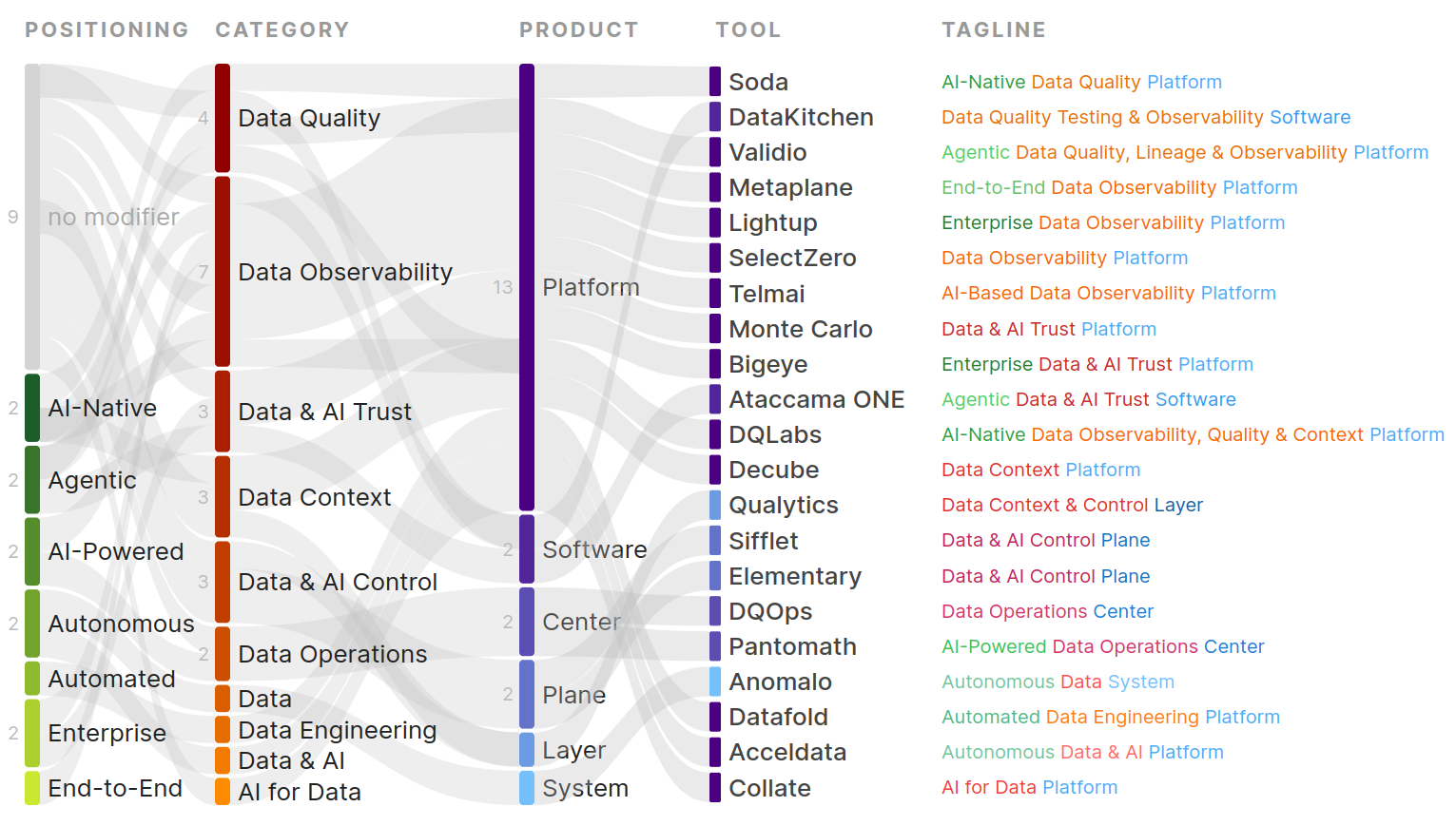
Data quality is traditionally thought of in terms of building on the understanding of your data and, consequently, building trust. To understand data, you need to look at your data. Yes, you cannot scan all your data, one table, one row, and one column value at a time. But you can efficiently look at a data sample, profile your data, build expectations, and test these expectations to grow your understanding, one test result at a time. This sounds like a slow, tiresome and error-prone process. Maybe partly the reason why data quality is not a sticky practice for most data teams. Today, AI agents (unlike humans) can already scan all your data, but they still require context to produce meaningful results.
See which tools support which features in the Data Quality Tools Feature Comparison.
Data Testing
Data tests and monitors are the most common features implemented by data quality tools. Tests and monitors compare data to expectations. While data tests require hardcoding expectations, data monitors compute expectations based on historical values to detect anomalies in recent data.
SQL Table Tests
There are a few open-source data testing tools developed by companies that also offer managed solutions. Notably, you may have heard of Great Expectations (GX Core, GX Cloud), Soda (Soda Core, Soda Cloud), and DQOps (DQOps Cloud).
It’s a bit tricky to draw the line between the open-source projects and the managed solutions. GX Core is a Python library of 50+ data expectations configured as JSON parameters passed to a Python function. GX Cloud, the managed version, was discontinued in May 2026 after Great Expectations was acquired. Soda Core is a CLI and Python library compatible with the Soda Checks Language (SodaCL) to write data quality tests and data contracts in YAML based on 25+ built-in data metrics and execute them programmatically. But to access more advanced features, such as data observability monitors, you need to install the Soda Library, which requires a Soda Cloud account. I find it easier to read and write tests as YAML rather than Python and JSON. Thus, I consider Soda to be more user-friendly than Great Expectations for those looking for an open-source code-based data testing library for data warehouses.
A third option is DQOps, which implements 150+ built-in data quality checks as templated Jinja2 SQL queries configured through YAML or a web UI. Note that to store data quality definitions and results in the cloud or create data quality dashboards, you need a DQOps Cloud account. A fourth option is DataKitchen's DataOps testing and observability open-source projects, with 40+ types of data quality tests with paid enterprise plans.
Data platforms have also implemented their native data testing solutions. AWS Glue Data Quality allows creating data quality rulesets using a domain specific language, DQDL (Data Quality Definition Language). Google CloudDQ is an open-source CLI to define data quality checks for BigQuery. Snowflake released DMFs (data metric functions) and expectations to create data quality checks. Not to forget dbt Core and Cloud, which are a common starting place for testing data warehouse models with built-in dbt tests and contracts (more on data contracts later), dbt-utils tests, dbt-expectations tests, and custom SQL tests.
You will find many other, more or less popular solutions by searching on GitHub. Previous and ongoing open-source data testing tools include MobyDQ (inactive) by the data team at Ubisoft, Datavines, and pointblank by the creators of RStudio.
Each tool names similar tests differently, making it hard to compare test coverage. Most tools categorize tests by data quality dimensions, the most common dimensions being:
- Data accuracy: find incorrect data acording to reference data.
- Data validity: find wrong formatted values or failing business rules.
- Data consistency: find inconsistencies across tables and time.
- Data uniqueness: find duplicate values.
- Data completeness: find missing values.
- Data timeliness: find outdated or late data.
Data quality tools also support creating custom tests as SQL queries that return failing rows or are used to flag a table or column. More important than the library of tests, is the developer experience to create tests, navigate tests results and act on test failures with code, in a UI, or with an AI assistant.
Data Contracts
Data contract tools like Entropy Data, Soda, Foundational, Gable, and Collate (managed OpenMetadata platform) define data contracts as a way to formalize expectations between data producers and data consumers.
I like to think about data contracts as a generalization of data tests (traditionally focused on data schemas and validation) to define groups of expectations and metadata for each data asset. This includes: data schemas, data validation rules, data ownership, data documentation, SLAs, data policies...
You may have also heard about dbt contracts. While dbt tests checks whether a data model meets a condition, a dbt contract prevents a data model from being materialized unless it meets the contract. To me this feels like bringing back good old data schemas (with a confusing name) which we abandoned when data professionals transitioned from databases to data warehouses that don’t require data schemas to be defined beforehand. Note that not all data contract tools will automatically prevent failing records from landing in the destination and quarantine it in intermediary tables for validation. This depends on how you integrate and run data contracts.
There is one main Open Data Contract Standard (ODCS). Entropy Data (previously known as Data Mesh Manager or Data Contract Manager) supports and contributes to ODCS and allows testing data contracts with their open-source Data Contract CLI to check data contracts during CI/CD or periodically.
Soda’s data contracts is a Python library to write data contracts in YAML using a specific format, but can also build contracts from ODCS files. Each time the pipeline produces or loads new data, you can programmatically trigger data contracts.
Collate supports writing data contracts in YAML that should follow their data contract JSON schema.
Gable’s data contracts are defined in YAML using a proprietary specification and stored in a separate git repository. Note that Gable integrates with databases and cloud storage (not data warehouses) and it's focused on validating data objects in memory.
Data Comparison Tests
This section covers data comparison tests, notably: data-diff tests, table comparison tests, and data reconciliation tests. Data diff tests compare all values across two datasets. Table comparison tests are more widely supported and most often are limited to checking that the number of rows or primary keys is the same between two tables. Data reconciliation tests are used to validate data migration or data replication jobs.
A full-featured data diff tool reports table-level, column-level, row-level, and value-level data differences. Data diff tools include Datafold and Recce. Datafold’s Data Diff compares datasets fast, within or across databases and files. In the past, Datafold open-sourced the data-diff CLI with a dbt integration, now archived and forked as reladiff. Now, Datafold focuses on automating and validating data warehouse and ETL migrations with AI agents that translate SQL and validate code changes based on data-diff reports. Recce is a dbt-specific tool to streamline the process of validating dbt code changes by seeing data impact reports in your PR, with full-featured data-diff views. Recce also provides a lineage diff graph.
Bigeye supports join rules for validating data across tables and sources and deltas to validate successful data replication, migration, or model code changes.
Soda supports three types of reconciliation checks: metric reconciliation checks, record reconciliation checks, and schema reconciliation checks. Ataccama ONE’s data reconciliation feature provides high-level checks of data consistency across multiple sources, mostly used for validating data migrations.
Telmai implements data diff for Parquet files. DataComPy by Capital One is an open-source library to compare two DataFrames in Pandas, Spark, Polars, or Snowpark. diffly by Quantco is a Polars-specific data-diff library.
DataFrame Tests
DataFrame tests are a means to validate data in files or database tables by loading it into a DataFrame, or to validate data in transit in your data pipelines.
Deequ by Amazon is an open-source library built on top of Apache Spark to define unit tests for any data that you can fit into a Spark DataFrame, like CSV files, database tables, logs… You can write tests in Scala, Java, Python with PyDeequ or DQDL. Databricks open-sourced DQX, a Python data quality framework for validating PySpark DataFrames across all Databricks engines: Spark Core, Spark Structured Streaming, and Lakehouse Pipelines / DLT.
Other open-source alternatives to validate Spark DataFrames include the independent SparkDQ library and Spark Expectations by the data teams at Nike. Dataframe-agnostic (Pandas, Polars, PySpark, DuckDB, ...) validation libraries include Union Pandera, Cuallee, and Validoopsie. Polars specific data validation libraries include patito and Dataframely.
Data Code Tests
Data code tests leverage SDKs and CLI's to validate data objects in memory from your codebase. Source code analysis is the process of finding the dependencies of code functions on data assets.
Gable static code analysis recognizes code (Python objects, PySpark, TypeScript) that generates data payloads, capturing the structure and types as a re-usable data asset definition. Data asset definitions can then be used to create data contracts. Gable also supports registering assets for Protobuf messages, Avro records, JSON Schema files, and S3 files.
Foundational has integrations for popular ORMs (SQLAlchemy, Liquidbase, Entity Framework Core, TypeORM, Ruby Active Record) to extract lineage by analyzing your source code and then create data contracts.
IBM Databand Python SDK allows logging and monitoring custom metrics and Python/Java/Scala function invocations. The Elementary Python SDK allows you to programmatically report data quality metrics to Elementary Cloud from your Python data pipeline code.
While not a data quality tool per se, Pydantic is a popular data object validation library that leverages Python type hints, similar usecase as the less well-known libraries Schematics and Schema.
Unstructured Data Tests
Unstructured data tests verify that unstructured data conform to specific rules. Rules are created as text prompts and applied to data through an LLM.
Elementary’s unstructured data validations validate unstructured data in a data warehouse field using an LLM prompt. Elementary leverages warehouse-native AI functions: Snowflake Cortex AI LLM functions, Databricks AI Functions, and Vertex AI models for BigQuery. This functionality can be virtually leveraged by any data quality tool that supports custom SQL tests, as it’s advertised by Validio’s custom SQL validator with LLM function calls, Monte Carlo’s unstructured data monitoring, or Ataccama ONE’s integration with Snowflake Document AI.
Only Anomalo and Lightup, both specialized data monitoring tools, seem to have built specific UXs for validating unstructured data. Anomalo’s unstructured data monitoring leverages a library of prompts with a focus to flag documents that contain PII and redact them. Lightup provides AI Data Profiling for documents (type, size, summary, FAQ) and implements document-level and folder-level metrics for document stores (S3, Google Drive, Box, OneDrive). Lightup even open-sourced lightudq without much public success. I feel like we are pretty early here.
Data Observability
Data monitors are the core feature of data observability tools. Data monitors normally rely on data profiling results and anomaly detection algorithms to detect anomalies.
Data Profiling
Data profiling enables understanding the properties of data by computing key table and column-level metrics. Table-level profiling metrics include: schemas with column types, row count, column count, latest updated date… Column-level metrics include counts and % of null/not-null values, unique/duplicate values, distinct values (cardinality), max/min/avg/std of numeric values or of lengths for strings.
Profiling results are used to suggest data tests and monitors, understand data models when writing aggregation logic, and help investigate a data quality issue. Most data quality tools implement profiling. Here are some examples.
Monte Carlo data profiler profiles up to 20M records and samples data up to 10k rows to recommend monitors. On top of metrics, you can see histograms of row counts and common values with day-aggregated metrics. Ataccama ONE profiling provides graphs for frequency analysis, frequency groups, and quantiles. Non-numeric attributes also benefit from mask analysis, pattern analysis, and length statistics. Telmai implements interactive profiling with pattern detection, value distribution, and drill down. Qualytics AI managed checks are automatically created from profiling results.
You will also find several open-source data profiling projects on Github. fg-data-profiling (formerly ydata-profiling) is the most popular data profiling library for Pandas and Spark DataFrames. Dataprof is a new and fast Rust library and CLI for profiling tabular data. DataProfiler by Capitalone is a DataFrame-based data profiler that also supports sensitive data detection.
Data Monitors
Most data observability tools combine tests and monitors, while users can choose between manual and automatic thresholds. Monte Carlo, like Sifflet, lists data tests and monitors under one list.
Sifflet provides automatic monitors to monitor all tables within selected schemas or databases for: freshness, volume, and schema change. Otherwise, Sifflet provides over 20 advanced monitors to be configured for: table-level health, metrics, field profiling, format validation, and custom monitors.
Metaplane makes it easy to quickly add monitors at the database and table level through their UI. At the database and schema level, you'll see a full list of tables that you can add freshness, column count, row count, or custom SQL monitors to. At the table level, you'll be able to apply any of the monitor types that Metaplane supports.
Schema Monitors
Schema change monitors detect changes in data schemas, like the addition or removal of columns, or type changes.
Freshness Monitors
Freshness monitors detect changes in the frequency of updates to data tables, and normally only check table metadata, such as the last updated timestamp.
Volume Monitors
Volume monitors detect changes in the ratio of data updates, based on storing statistics about the number of row additions, updates, and removals.
Field Monitors
Field statistics monitors compute statistics on a field, like the count or % of duplicates, null values, wrong format values, or aggregations like the max, min, or avg.
Custom Monitors
Custom monitors are normally written in SQL and compute business metrics that may aggregate multiple column values, and are used to alert of unusual activity, which can still be legit but should not happen unnoticed.
Window-Based Monitors
Validio provides tumbling and sliding window-based validators for data lakes, data warehouses, and data streams. Configuring a validator requires configuring a metric, a field, a filter, a window, segmentation, and a threshold. Validio backfills allow you to see incidents detected on historical data and triage them to retrain anomaly algorithms for future incidents. Data quality scores are calculated as the ratio of windows without incidents to the total number of windows. Other tools that put forward window-based monitors include Telmai and Lightup.
Anomaly Detection
When creating anomaly detection tests, you first need to collect metrics for historical values. To configure anomaly detection tests, you need to specify at least a column with a timestamp, a frequency to compute buckets, and a sensitivity to fire alerts. Most often, seasonality and trends in your data are taken into account. When a tool says that it supports anomaly detection, it would do it for at least three metrics: freshness, volume (row counts), and schema changes. Supporting anomaly detection for custom metrics is more rare.
Pipeline Monitors
Pipeline monitors allow you to collect statistics (schedules, durations, costs) about pipeline jobs, query logs, and database transactions. IBM Databand pipeline monitoring can create a lineage graph that spans tasks across dbt, Spark, Airflow, and custom code-based functions. Other tools with cost monitoring and FinOps features include: Unravel Data cost and performance optimization for all major cloud warehouses, Elementary for dbt jobs, Monte Carlo and Acceldata.
Data Quality Workflows
Data quality workflows allow you to schedule and orchestrate tests from your data pipeline code, data orchestrator, CI/CD pipeline, terminal, code editor, or AI agent.
Scheduling
All managed data quality tools allow scheduling tests periodically with standard frequencies or cron expressions.
Orchestration
Data quality orchestration is the process of triggering tests and monitors from other components of your data stack. This is useful when data is not produced or consumed at regular intervals, and you want to check for data quality more granularly.
Data testing tools like Soda and Great Expectations provide Python SDKs that allow you to create tasks to trigger tests from data orchestration tools like Airflow, Prefect, or Dagster. You can also pull test results to semaphore pipelines.
DQX by Databricks applies checks on a DataFrame and can quarantine invalid records to an intermediary table to ensure that “bad” data is never written to the output.
iceDQ uses the term data monitoring to gather services such as white-box monitoring (circuit breakers), data contracts, input data validation, and data reconciliation.
CI/CD
Datafold, Recce, Gable, and Foundational are part of the shift-left data quality movement and provide CI integrations. For example, Datafold and Recce allow to compare data between production, staging, and development to validate SQL/ETL code changes based on data impact reports during CI.
MCP Server
MCP servers from data quality tools can be leveraged by coding agents to generate tests, debug issues, and refactor issues directly from the IDE. Beyond that, the MCP Servers from data quality and observability tools that are aware of data schemas and relationships can be leveraged from AI coding agents to generate code that works with your data.
Datafold MCP allows AI agents to validate their own work with data-diff reports, reconcile data across sources and debug production data monitor failures. Qualytics MCP provides AI agents with data quality scores (a way to measure AI-readiness), discover data assets, and trigger data quality workflows.
Data Quality Dashboards
Data quality tools implement different kinds of data quality dashboards that include data quality KPIs, data observability reports, data quality scorecards, data table health reports, incident management reports, custom reports, and job performance reports.
Data observability reports provide statistics about the number of tests (with test coverage) and test results (failing/passing). Elementary provides a data observability dashboard with KPIs and evolution graphs for test results, table health, and test coverage.
Data quality score reports include the data quality score for each data quality dimension applied at the data source, table, and column levels. DQOps calculates data quality KPIs as a percentage of passed data quality checks out of all executed checks. Elementary uses the same formula and allows customization of the mapping of tests to dimensions and the weights for each dimension. Instead, Decube calculates data quality scores as the ratio between the number of failed and scanned rows. Data table health reports gather all scores for a table and its columns in one view.
Incident management reports include metrics about the total number of incidents, status breakdowns, and time to resolution. Decube provides an incident dashboard with statistics about all incidents, incidents assigned, incident levels, data contracts breached, and average time to close incidents. Monte Carlo includes a data operations dashboard with the number of data incidents and time to resolution.
Custom data quality dashboards create views with filters to focus on critical data assets, data sources to share with data producers, or data models to share with data consumers. Metaplane allows the creation of custom dashboards for specific roles. DQOps allows the creation of fully customizable dashboards on Looker Studio.
Performance reports include statistics about ETL jobs and database queries. Monte Carlo performance dashboard allows investigating high-cost queries, slow dbt jobs, and slow Airflow DAGs. Elementary dbt performance report is focused on execution times for dbt models and tests.
On top of being able to see and compare generic data quality metrics, most data quality tools allow you to navigate, filter, and sort test results in a table view.
Data Lineage
Data lineage is a popular feature of data quality tools to extract and visualize data dependencies. Data lineage helps data teams and AI Assistants understand data models, prevent data quality issues with data impact reports during CI, debug data quality issues with Root Cause Analysis (RCA), find unused data to deprecate, and plan data migrations.
Most data quality tools implement data lineage; when they don’t (e.g., Great Expectations, Soda), they integrate with data governance tools (notably Atlan and Alation) that provide data lineage and a full-featured data catalog.
There are two main approaches to how lineage is built: query log parsing and manifest-based lineage.
Query log parsing is the most common approach. Tools connect to your data warehouse’s query history and parse the SQL statements to infer which tables were read and written. Tools that rely primarily on query log parsing include Monte Carlo, Metaplane, Bigeye, OpenMetadata and Sifflet.
Manifest-based lineage uses a compiled dependency graph generated by your transformation tool — most commonly the dbt manifest.json, which explicitly declares every model’s upstream and downstream dependencies. Tools that are dbt-native and rely on the manifest include Elementary, Datafold, and Recce.
In practice, most commercial tools combine approaches: they parse query logs for broad coverage and enrich with manifest or runtime data when available.
Column-Level Lineage
Column-level lineage expands table-level lineage to show dependencies between columns within a database. Column-level lineage is most often built from parsing SQL statements from query logs on your data warehouse or the dbt manifest when available. All data quality tools that implement lineage provide column-level lineage, apart from Lightup, which implements only table-level lineage.
Bigeye’s column-level data lineage graph allows you to highlight the upstream and downstream dependencies of a column.
Validio, like most data lineage tools, runs daily jobs to collect the latest information about lineage relationships from the Information Schema which can incur on a delay from when a new relationship is created until it is visible on the lineage graph.
Cross-Application Lineage
Cross-application lineage extends lineage from the data warehouse to multiple data storage locations, spanning data sources to BI dashboards and data activation.
Metaplane end-to-end data lineage shows dependencies for integrations across data integration (Fivetran, Airbyte), transformation (dbt), orchestration (Airflow), BI (Tableau, Looker…), and data activation (Hightouch, Census…).
Data Incident Management
Data incident management is the process of solving data quality issues, starting with triaging issues to create incidents, firing alerts when necessary, and resolving incidents.
Issue Triaging
Issue triaging is the process of classifying an issue and adding it to a workflow that will take it to resolution. Classifying an issue includes adding information such as the owner, priority, impact, the date the test started failing, correlation to other issues, and further context to help debug the issue, including reports about the evolution of the number of rows in the table and the last updated date. This way, owners can filter issues by data domain, sort by priority, and handle related issues in one go.
Elementary incidents start with a single event but can include multiple events grouped.
In Soda, when a check fails, you can create an incident in Soda Cloud to track your team’s investigation and resolution of a data quality issue.
Sifflet incident management also provides a timeline with a chronological view of the incident, including when the issue was first detected, when the incident was created, and any status changes or comments made by your team.
Alerts
Alerts are fired after some initial issue triaging. Alerts depend on notification configurations to notify owners across channels such as email, Slack, and Microsoft Teams. Some tools integrate with issue tracking software like JIRA (Metaplane, ...) and ServiceNow (Soda, ...).
Data Incident Resolution
When a test or monitor fails, there can be multiple causes and actions. Failing tests can be the cause of changes in the code, data, or infrastructure. Code changes break data tests, source data changes and schema changes break downstream data, and infrastructure (servers, ingestion jobs) may fail. Resolution may come from editing data, code, infrastructure or the test itself. Some issues may autoresolve on the next pipeline run or require manually rerunning a pipeline.
Some test failures are easier to interpret. The easier tests failures to interpret are those that flag a value in a row. Test results that depend on multiple rows or values (sum, average) or monitors that depend on dynamic thresholds are harder to interpret. You won’t immediately know which record needs to change for the test to pass. Not all test or monitor failures mean that there is something wrong with the data. Some tools, like Elementary support false positive feedback to fine-tune the anomaly detection algorithm and stop getting alerted by false positives.
Soda allows you to inspect rows that didn’t pass a test and introduced Soda Cleanse for automated remediation of data quality issues. Sifflet announced three AI agents (Sentinel, Sage, and Forge) to suggest monitors, debug issues, and suggest fixes. Bigeye’s BigAI provides incident descriptions, suggested resolutions, suggested preventions, and cron suggestions. Elementary's Ella provides specific AI agents for test recommendation, issue triage and resolution, governance (create documentation, enforce policies, tag data), performance, and data discovery. Synq (now acquired by Coalesce) built Scout, the Data Quality AI Agent. Coalesce Data Quality advocates that data should be fixed on the transformation layer, Coalesce's main offering.
Telmai implements data binning to categorize data into "good" and "bad" bins that need to be reviewed and circuit breakers.
Master Data Management
Master Data Management (MDM) is the process of data stewards solving data quality issues originating from source data (master data), and includes imputing missing data, removing duplicates, fixing inconsistencies, validating data changes, correcting data, enriching data (classification, extraction…), and merging records across sources.
MDM and Reference Data Management (RDM) at first sound more like legacy features from enterprise data management platforms like Informatica, but I am surprised that modern data quality tools haven’t implemented what I consider the most basic and important data quality feature, the ability to view and edit your data. This feature today is more part of Data IDEs like DataGrip and DBeaver, and code IDEs for data teams (Paradime, nao). I can’t believe that modern data teams using dbt and the like don’t ever curate master and reference data manually, apart from creating seed files.
Today, Ataccama ONE is the data quality tool that best supports MDM, with complementary products: Ataccama ONE Data Quality & Catalog, Ataccama MDM, and Ataccama RDM. Ataccama ONE Data Tables provides a UX interface to navigate data tables with filters and data quality scores per column and flagged rows and columns. Ataccama MDM exposes master data through a web interface, with a feature set for data governance: browsing, searching, viewing, creating, and modifying data, and issue resolution support. Ataccama RDM manages reference data by supporting formal, defined processes and ensuring central authority over all reference data changes.
My take is that all data generated by AI agents should be considered as source data, and thus Master Data Management will become simply Data Management. Data quality tools are well positioned to solve this need. The need to validate and clean generated by humans and AI alike (more about this on the trends section). Watch this space!
Tell me who you integrate with, and I'll tell you who you are. I gathered integration support by tool in an Integrations Comparison Table with the help of Claude Code Agent Skills. Take this data with a pinch of salt!
Collate is the most integrated data quality tool with over 100 integrations, followed by Monte Carlo, Anomalo, and Elementary. On the other side, you have platform-specific tools like DQX by Databricks, Google CloudDQ, AWS Glue Data Quality, IBM Databand and Coalesce Data Quality. Almost all tools integrate with the most popular data warehouses (Snowflake, BigQuery, Redshift, and Databricks) and most integrate with relational databases such as PostgreSQL and MySQL. Note that Gable is the only tool that doesn't integrate with data warehouses as it focuses on relational databases and data streams. Validio leads integrations with data streaming technologies such as Kafka, Google Cloud Pub/Sub and AWS Kinesis. Telmai excels at data lakes and lakehouses with integrations for object storages (S3, GCS, Azure Data Lake Storage, Databricks Delta Lake...), query engines (AWS Athena, Trino) and data formats (Iceberg, Parquet, Avro, Delta Lake).
The second most popular integration category is BI tools (lead by Tableau, Power BI and Looker), which is mostly due to data quality tools that provide end-to-end data lineage. Specialized data testing tools like Soda and data monitoring tools like Anomalo promote integrations with data governance tools like Atlan and Alation to add data quality scores to catalog items and see data lineage. Anomalo also integrates with all the cloud-native catalogs like Databricks Unity Catalog, Microsoft Purview, Google Dataplex Universal Catalog and Snowflake Horizon.
Some tools are originally niched to a stack, like dbt native tools Elementary and Recce. Metaplane provides the wider integration range for a Modern Data Stack across storage (Snowflake, ...), orchestration (Airflow, ...), transformation (dbt, ...), BI (Metabase, ...) and activation (Hightouch, ...). Bigeye covers both modern and legacy stacks (Informatica PowerCenter, Matillion, IBM DataStage, Microsoft SSIS, ...).
Data quality tools pricing range from free open-source projects to enterprise platforms costing hundreds of thousands of dollars per year. Most vendors don't publish prices publicly — but a handful do, and the AWS Marketplace surfaces list prices for enterprise tiers. Prices below are estimates based on public pricing pages and the AWS Marketplace, and may not reflect current rates. You can fill up the feedback form to suggest an update.
| Tool | Pricing Model | OSS / Free | Entry Team Price | Entry Enterprise Price |
|---|
| Google CloudDQ | — | OSS CLI | — | — |
| DQX by Databricks | — | OSS library | — | — |
| DQOps | Per user + table | OSS self-hosted | $600/month (1 user, 200 tables) | Custom |
| DataKitchen | Per user + database | OSS self-hosted | $250/user/month + $100/database/month | Custom |
| Entropy Data | Per user | OSS or Free (limited features) | $990/month (10 users) | Custom |
| Soda | Per table | OSS CLI or Free (limited credits) | $750/month (20 tables) + $8/table/month | Custom |
| Great Expectations | Per user + table | OSS library (GX Core) or Free (3 users, 5 tables) | Custom | Custom |
| Collate | Per user + table | OSS (OpenMetadata) or Free (5 users, 500 tables, waitlist) | $60,000/year (25 users, 5,000 tables, AWS) | Custom |
| Elementary | Per user + table | OSS self-hosted | Custom | $120,000/year (20 users, 10,000 tables, AWS) |
| AWS Glue Data Quality | Per DPU-hour | OSS library (Deequ) | $0.44/DPU-hour | — |
| Recce | Per agent review | Free (100 reviews/month) | $250/month (1,000 reviews) | Custom |
| SelectZero | Per user + monitor | Free self-hosted (1 user, 50 monitors) | Custom | Custom |
| Metaplane | Per user + table | Free (1 user, 10 tables) | $10/table/month (5 users, 100 tables) | Custom |
| Decube | Per user + monitor | — | $21,000/year (10 users, 1000 monitors) | Custom |
| Sifflet | Per table | — | $48,000/year (500 tables, AWS) | Custom |
| Monte Carlo | Per credits (Credit Calculator) | — | $50,000/year (AWS) | Custom |
| Telmai | Per data volume | — | Custom | $60,000/year (AWS) |
| Bigeye | Per table | — | $45,000/year (100 tables, AWS) | $75,000/year (300 tables, AWS) |
| Acceldata | Per user | — | Custom | $100,000/year (AWS) |
| DQLabs | Custom | — | Custom | $140,000/year (AWS) |
| Pantomath | Custom | — | Custom | $250,000/year (AWS) |
Where to start: DQOps, Soda Core, GX Core, DataKitchen, Elementary, and OpenMetadata all have free open-source versions you can self-host. Metaplane, SelectZero and Recce offer permanently free tiers for small teams. Kudos to Collate (managed OpenMetadata) for offering the most generous free plan (5 users, 500 tables) with more tables than in many other AWS Enterprise plans. Collate's team pricing offers the most competitive price per table at an easy to understand 1$/table/month rate.
On pricing models: I've noticed that most data quality tools update the pricing model (from user based, to monitor based, to table based, to consumption based) and cost several times per year (from public pricing, to private pricing, back to public pricing). Honestly, it feels like no tool has figured out a pricing that works, so they keep iterating from the easiest to implement model (user based) to the most complex one (consumption based). The good news is that you can use this to negotiate pricing, and ask for a custom price based on value. If you need historical data points, you can view older pricing by entering the pricing url in the Internet Wayback Machine. Good luck!
On enterprise pricing: The AWS Marketplace list prices for enterprise tiers tend to match the annual salary of a US-based Senior Data Engineer. These are list prices — vendors negotiate, and multi-year contracts typically get meaningful discounts.
Snowflake-native options: Some tools run entirely inside your Snowflake account without requiring credentials or data to leave the warehouse. Metaplane supports Snowflake native monitoring. Ataccama ONE offers Data Quality Gates for Snowflake. Unravel Data has a Snowflake Native App for cost and performance optimization. Sifflet accepts Snowflake credits.